Beginner Series 5 (I): Crypto Prediction Markets Explained: USDC, Wallets, and Getting Started
A detailed technical guide demystifying crypto infrastructure on prediction markets. This is for beginners, traditional bettors, and newcomers in the space, covering wallets, stablecoins, and Polygon.

This is the first piece of 3 of part V of the series "Beginner Series”. In this article, we break down the complexities of the intersection between cryptocurrency and prediction markets. You will learn why prediction market platforms integrate crypto, how to connect your wallet to Polymarket, how to deposit and withdraw crypto, and how to secure your wallets.
One of the most popular avenues to deposit funds on prediction market wallets is (and has always been) cryptocurrency. Polymarket started exclusively as a crypto platform, before opening its doors to other forms of payment, such as debit and credit cards in 2024, almost 4 years after its launch.
While crypto offers the ability to deposit an unlimited amount to these platforms — compared to the $50,000 limit on fiat channels — the process can be quite tedious and confusing for users who have never interacted with crypto wallets.
Crypto-based prediction markets offer significant advantages — instant settlements, lower fees, global access — but the technical barriers scare away people who would benefit from using them. This guide eliminates those barriers.
Why Platforms Use Crypto at All
Polymarket, Kalshi, and other exchanges accept credit cards and bank transfers like normal websites. However, these methods have only recently become popular. Why?
Traditional payment systems require intermediaries. Banks, payment processors, compliance departments. Each layer adds fees, delays, and restrictions. Want to instantly settle a bet with someone in another country? Good luck getting that through the banking system quickly.
Crypto eliminates intermediaries. You hold your funds in a wallet you control. Trades settle in seconds. No bank can freeze your account because they don’t like what you’re betting on. No payment processor can block your withdrawal.
For prediction markets operating globally, these aren’t nice-to-have features. They’re fundamental to the business model.
Understanding The Stablecoins You’ll Use
Bitcoin and Ethereum fluctuate wildly. You can’t price prediction market shares in something that changes value by 5% overnight.
Stablecoins solve this. These are assets that are pegged 1:1 to the US dollar. For example, one USDC always equals one dollar. You can trade, hold profits, and withdraw without worrying about crypto price swings. Everything on prediction markets is measured in stablecoins/dollars.
Think of stablecoins as digital dollars that move on blockchain rails instead of through banks. The stability of traditional currency with the speed and accessibility of crypto.
The most popular of them is USDC, which is issued by Circle, a regulated US company. It’s backed by actual dollars and short-term US treasuries held in reserve. When you hold USDC, you effectively hold a claim on those reserves.
Starting Your Crypto Journey on Polymarket
For this section, we will use Metamask as our preferred wallet and USDC as the preferred stablecoin.
Setting up a crypto wallet
Most people use MetaMask, which works as a browser extension or mobile app. The setup takes about five minutes:
Download MetaMask from the official website. Create a new wallet. Write down your recovery phrase (12 or 24 words) and store it somewhere secure. This phrase is your backup — if you lose access to your device, it’s the only way to recover your funds.
Never, and I mean never, share your recovery phrase with anyone. Not customer support, not Polymarket staff, nobody. Anyone with those words controls your money.
Once your wallet is created, you’ll see an Ethereum address that starts with “0x” followed by 40 characters. This is like your account number. You’ll use it to receive USDC.
Getting USDC Into Your Wallet
You have three main options:
Buy directly through your wallet: MetaMask and other wallets let you purchase crypto with a credit card. This is easiest but comes with fees of around 3–4%.
Transfer from an exchange: If you already use Coinbase, Kraken, Binance, or another exchange, buy USDC there and withdraw to your wallet address. Fees are lower (~<$1), but the process has more steps.
Use an on-ramp service: Platforms like MoonPay or Ramp let you buy USDC directly. Some prediction market sites integrate these services, making the purchase one-click.
For your first deposit, I recommend buying $25–50 worth. Enough to trade but not enough to stress about if you make mistakes during the learning process.
The Polygon Network (This Part Confuses Everyone)
USDC exists on multiple blockchains. Ethereum, Polygon, Arbitrum, and others. Polymarket uses Polygon because transactions are faster and cheaper.
Think of it like this: USDC is the currency. Polygon is the payment network it travels on. Similar to how the same dollar can move through Venmo or Zelle — same currency, different rails.
When adding USDC to Polymarket, you need USDC on the Polygon network specifically. If you send USDC on Ethereum by mistake, it won’t show up in your account.
Most wallets let you switch networks with a dropdown menu. Make sure you select “Polygon” before depositing or withdrawing.
Step-by-Step Depositing Guide on Polymarket
Log in to Polymarket and click “Deposit” on the top right-hand side of the page.
2. On the “Use Crypto” tab, click “Connect Exchange” if you have a Coinbase account. If not, click “Transfer Crypto”.
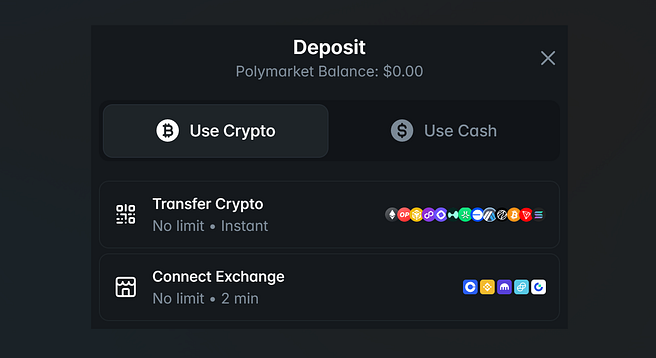
Deposit crypto directly from your exchange or crypto wallet
3. On the resulting page, copy the deposit address and paste it into your withdrawal wallet or scan the QR code using the app/wallet that holds your funds. Here, select the coin you wish to deposit and the blockchain you will use.
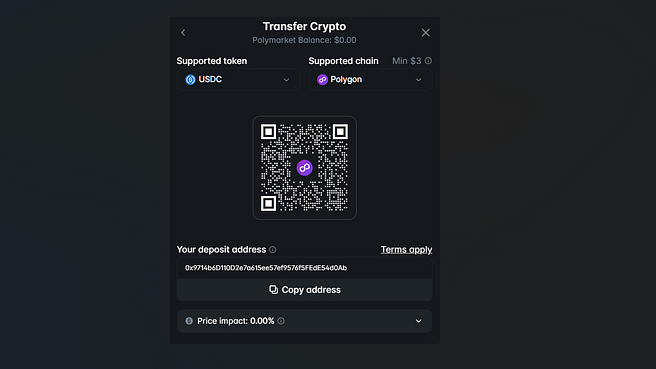
NB: Make sure you double-check that the blockchain and crypto for the withdrawal align with the deposit ones.
6. Enter the amount you want to deposit and send. Expect to see the cash deposited to Polymarkets in a few minutes.
Making Your First Trade
Once USDC is in your Polymarket account, trading is straightforward. Browse markets, click one that interests you, choose “Yes” or “No,” enter an amount, and confirm the transaction. Every time you trade, you will be required to confirm the trade on the pop-up Metamask wallet.
Your first trade will feel slow because you’re learning the interface. By your tenth trade, the process takes seconds.
The confirmation step happens in your wallet. You’ll approve the transaction, and it’ll process on-chain. This means there’s a permanent record of your trade that anyone can verify. That transparency is part of why people trust prediction markets — no hidden book adjustments or disputed settlements.
Withdrawing Your Profits
When you’re ready to cash out, the process reverses. Transfer USDC from Polymarket to your wallet. Then either sell USDC for dollars through an exchange, or use your wallet’s built-in conversion feature.
Withdrawals typically process within minutes. No waiting for bank transfers to clear. No withdrawal limits based on arbitrary platform rules.
One caution: check current withdrawal fees before moving funds. Sometimes network congestion makes transactions expensive. If gas fees are temporarily high, waiting a few hours can save you money.
Common Issues and How to Fix Them
“Insufficient funds for gas.” You need a tiny amount of MATIC (Polygon’s native token) to pay transaction fees. Most wallets let you buy a few dollars’ worth. You’ll need $1–2 for dozens of transactions.
“Transaction failed” Usually means you didn’t have enough balance for the trade plus fees. Cancel and try with a smaller amount.
“Wrong network”: You sent USDC on Ethereum but needed Polygon. Contact support — sometimes they can help recover funds, but it’s not guaranteed. Always double-check the network.
Security Basics (This Matters)
Enable two-factor authentication on any exchanges you use. Use a hardware wallet like Ledger if you’re holding significant amounts. Never click links in emails claiming to be from MetaMask or Polymarket — always navigate directly to official sites.
Crypto gives you control of your money. That’s powerful, but it means you’re responsible for security. No bank will reverse fraudulent transactions. No customer service can recover lost wallet passwords.
The tradeoff is worth it if you handle security seriously. Just understand what you’re signing up for.
Is the Complexity Worth It?
For someone depositing $20 to try prediction markets, probably not. Use Kalshi or another USD-based platform. The crypto overhead isn’t worth it for casual experimentation.
For serious traders who value low fees, instant settlement, and unrestricted access to global markets, absolutely. The initial learning curve pays dividends quickly.
I spent three hours fighting with wallets and networks when I started. Now I can deposit, trade, and withdraw in under five minutes. The knowledge compounds.
If you’re committed to trading prediction markets seriously, learn the crypto infrastructure. It opens doors that USD-only platforms can’t match.
If you’ve made it this far, you’re exactly the kind of reader this series is written for. Follow Prediction Frontier on Medium, Substack, and Twitter for the next drop.